Settings
HUNGER Aimbot Settings: FOV, Smoothing, and Bones
Nov 21, 2026 · Updated Nov 24, 2026 · 4 min read
How to tune HUNGER aimbot settings on PC: FOV, smoothing, bone selection, visibility checks, and a distance cap before a hard snap.
HUNGER combat is first person, with ranged weapons and a real melee system, not a tacked-on shove. An aimbot that snaps across a doorway will look worse here than it does in a flat shooting range. The merchant list does not include a magic “natural” preset. You still have to set the sliders.
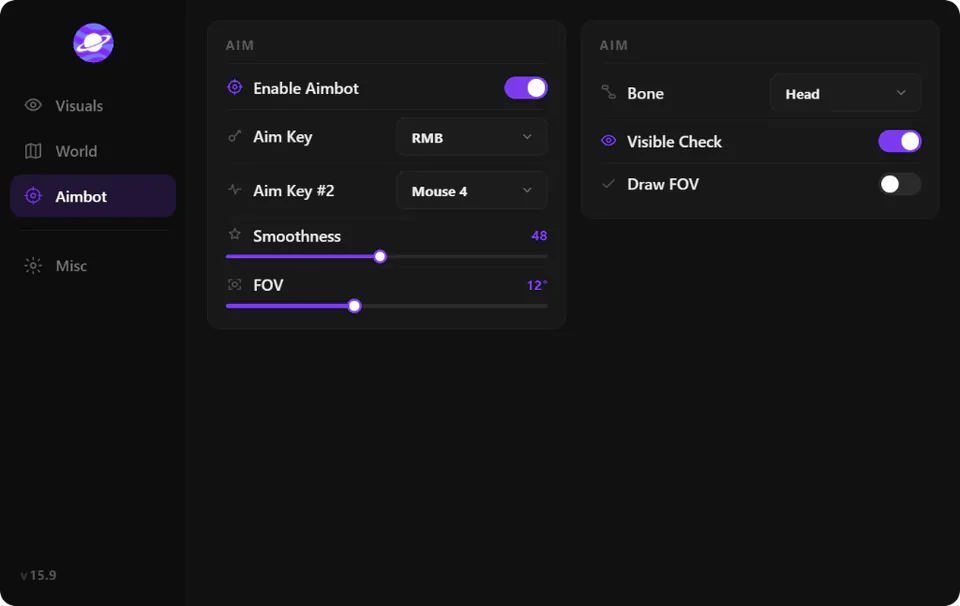
The options on Complete are a custom hotkey, adjustable FOV, bone selection, humanized trajectories, aim prediction, visibility checks, dynamic FOV, smoothing, team filtering, and a maximum target distance. If checkout is missing one of those, do not assume this page invented it back.
FOV and smoothing
FOV is how far from the center of the screen a target can be before the assist considers it. A wide circle in a tight interior will grab the wrong silhouette. Start small. Smoothing is what keeps the reticle from jumping. If a clip looks robotic, lower FOV before you blame the bone.
Dynamic FOV is listed as its own toggle. Treat it as optional until the static circle already feels usable.
Bones, prediction, and visibility
Bone selection chooses where the assist prefers to sit. A head preference with no smoothing is the usual “too snappy” complaint. Visibility checks are there so the assist ignores someone you cannot actually see. Prediction matters more when the target is moving across open ground than when you are already in melee.
Team filtering keeps squadmates out of the pull in duos and trios. Leave it on unless you are testing alone. A maximum distance stops the assist from reaching across an empty field toward a figure you were never going to fight.
Where to test
Load a conservative preset in a quiet area before an expedition that you care about. The ESP and radar guide covers the overlay that should be readable at the same time. Both groups ship on the Complete feature listing. Turning aim off in the menu is allowed if you only wanted information.
Questions about this guide
- Which aimbot options are listed for HUNGER?
- Hotkey, FOV, bone selection, humanized trajectories, prediction, visibility checks, dynamic FOV, smoothing, team filters, and maximum distance. Confirm the live list on checkout.
- Should I start with a wide FOV?
- No. Start tight, with visibility checks on, and raise FOV only after the pull looks readable in a quiet area.
Keep reading

Utilities
Cloud DMA Software: The Single-PC Layer, Explained
What Cloud DMA software is on this site: a single-PC Hyper-V layer for HUNGER, not a second tower, with required extras sold separately.
Nov 23, 2026 4 min read
Read Cloud DMA guide
Buyer's Guide
HUNGER Cheat Buying Checklist: Modules, Status, and Delivery
A practical checklist for comparing HUNGER cheat listings: verify the module list, live status, portal delivery, and any separately required utilities.
Nov 22, 2026 4 min read
Read buyer guide Plans
HUNGER Cheat Plans: Complete Suite vs Utilities
Compare HUNGER cheat plans on PC: the Complete suite versus Cloud DMA, the HWID Spoofer, and Skin Changer. Confirm each module on checkout.
Nov 20, 2026 4 min read
Read plan comparison